
Fraud Blocker

S T A R T E R G U I D E

CPC INTERFACE CABLES

CHECKPOINT 08

Below is CPC Interface Cable information, installation and links.

Cable Types

We manufacture 3 types of CPC Interface Cables to apply to your plasma cutter:

➤ CPC Interface Cable (4-PIN)

For Hypertherm® Non-SYNC Plasma Cutting Systems. 

➤ CPC Interface Cable (6-PIN)

For Hypertherm® SYNC Plasma Cutting Systems. 


➤ Open-ended CPC Interface Cable

For Plasma Cutters that are not Hypertherm®. (This will require some communication & wiring installation with the Plasma Cutter Manufacturer. You will also be required to share which CNC controller software is installed on your table.)

IMPORTANT: CPC Interface Cables are FREE of charge only when purchasing a Hypertherm® Plasma Cutting System with STVCNC® Automation Solutions. If you have your own plasma cutter with mechanized torch, it would be recommended you check with your STVCNC® Sales Team Member for the correct CPC Interface Cable you require for your system. Because of the variable scenarios you will need to:
1. Specify what software you’re running on the STV® Table
2. Specify if you have a Hypertherm® or a different branded cutting unit
3. If you do have a Hypertherm®, specify if its a SYNC or NON-SYNC model unit. 

CPC Interface Cable

We produce the handcrafted wiring necessary to connect specifically to the CPC port. This CPC interface cable, labeled as the “P-Cable”, gives the controller the capability to start and stop the arc on the torch as well as monitor voltage outputs for the torch height control.

Making sure your plasma cutting unit is OFF, connect your P-Cable (CPC Interface Cable) from the “P-port” found on the back side of your STVCNC® Control Box out to the back side of your plasma system. 

(Tap on image to enlarge.)
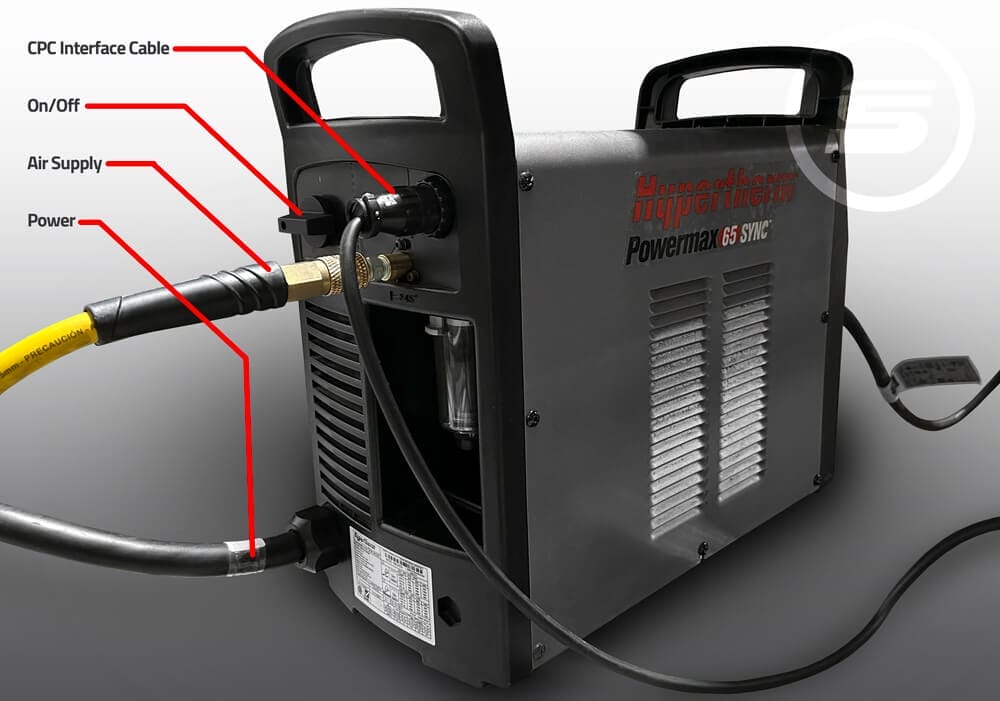
Attention: If you purchased a New Plasma Cutter with us, your purchase includes the necessary Mechanized Torch & STVCNC® CPC Interface Cable that applies along with the unit. If you did not purchase a Hypertherm® cutter with us, then you will need to speak with your STVCNC® Sales Agent to obtain a CPC Interface Cable that works directly with your cutting unit. For the Optimum Control System, the plasma interface cable also has an “arc ready” signal which the control system uses to determine when the plasma arc has been ignited.  We configure our controllers to receive a divided voltage signal from the plasma arc to regulate torch height via the THC system. A raw arc voltage can be used, however, it is necessary to make a wiring change inside the control box. If you are not sure about the output of your plasma cutter, please contact our tech support team for further assistance. stvcnc.com/support

Non-Hypertherm

We would recommend you validate and check with a Professional & Certified Electrician for Electrical Setup and changes and confirming with your Plasma Cutting Unit Manufacturer before performing any work on your unit. The safest recommendation is purchasing a CPC Interface Cable with STVCNC® by calling 1-888-701-7101.


Need Additional Support? We can help.

Our STVCNC® Technical Support Team is recognized for offering solutions & customer support methods (as listed below) well before any escalation occurs where you take advantage of enjoying the ease of having us delegate replacement parts and resolutions to prevent any extended amounts of down-time.

Tap now & Schedule your TechTalk with STVCNC®, Automation Solutions.

A Support ticket will place you in queue for a direct one-on-one call with one of our Team Members.